Categories
Undergraduate Fellows

Call Me Will

I’m the new guy. My name is Will Tucker and I’m currently a sophomore here at W&L. I come from Minneapolis, Minnesota (so I know what a cold winter feels like), and I’m currently the first Fellow to be admitted after 1st Semester–having not applied for the yearlong fellowship. I will be majoring in Politics with an emphasis in Political Philosophy, and while my minor has yet to be figured out, I hope to take a minor in German or even Digital Humanities–if DH gets approved as a minor in time for me to do so.

Politics and DH sound like an unlikely duo; however, I can assure you otherwise. The massive amount of data currently being demanded and processed by DC think tanks,  lobbying groups, the bureaucracy, the media, and the data that influences election-time decisions is at a high in this Digital Age. For example, one of the largest scandals of 2016’s election was the release of ~70,000 emails lifted from John Podesta (the campaign chair for Hillary Clinton) and published in full to WikiLeaks. What was inside the emails shocked many US citizens, and I am confident that the evidence of corruption put on WikiLeaks was on many minds inside the voting booths. My project this year will be focusing on this data, and I hope to be able to definitively say how corrupt the Clinton campaign really was. Perhaps the pandemonium induced by the emails actually carried more weight than the contents of the emails–or maybe the Clinton’s were just as corrupt as many thought.

I found DH this past fall through the advice of my academic advisor, Paul Youngman. Dr. Youngman suggested around mid-July that a new class was coming to W&L in the fall. It was called “Intro to Data in the Humanities”, and after reading the description I thought I had found a fun, easy way to get my Science FDR credit. I was very wrong. Within the first week, I was hooked on the opiate of making large projects on my computer. I was almost instantly addicted to the satisfaction that comes from getting a program to work that has been giving problems, to the pride of seeing a finished project–one that I started. It was because of this class that I found out about the Fellows program, and I couldn’t wait to start. Instead of waiting until May, I asked Ms. Brooks if I could do it starting 2nd semester–and here I am.

Here’s to a good next two years of this Fellowship.

-W


Categories
DH Event on campus Speaker Series

DH Event: Digital Humanities, Data Analysis and Its Possibilities

Visiting us from University of Richmond, Assistant Professors Lauren Tilton and Taylor Arnold will give a talk on exploratory data analysis methods, which have received limited visibility in DH. In this talk, they will give an overview of the historical developments of exploratory data analysis and statistical computing. They will show, through examples from their work on visual culture, how both have the potential to shape digital humanities projects and pedagogy.

Thursday, February 2nd, 2017
12:15-1:15
IQ Center (Science Addition 202A)
Please register


Lauren Tilton is Visiting Assistant Professor of Digital Humanities at the University of Richmond and member of Richmond’s Digital Scholarship Lab. Her current book project focuses on participatory media in the 1960s and 1970s. She is the Co-PI of the project Participatory Media, which interactively engages with and presents participatory community media from the 1960s and 1970s. She is also a director of Photogrammar, a web-based platform for organizing, searching and visualizing the 170,000 photographs from 1935 to 1945 created by the United States Farm Security Administration and Office of War Information (FSA-OWI). She is the co-author of Humanities Data in R (Springer, 2015). She is co-chair of the American Studies Association’s Digital Humanities Caucus.


Taylor Arnold is Assistant Professor of Statistics at the University of Richmond. A recipient of grants from the NEH and ACLS, Arnold’s research focuses on computational statistics, text analysis, image processing, and applications within the humanities. His first book Humanities Data in R, co-authored with Lauren Tilton, explores four core analytical areas applicable to data analysis in the humanities: networks, text, geospatial data, and images. His second book, the forthcoming A Computational Approach to Statistical Learning (CRC Press 2018), explores connections between modern machine learning techniques with connections in statistical estimation. Numerous journal articles extrapolate on these ideas in the context of particular applications. Arnold has also released several open-source libraries in R, Python, Javascript and C. Visiting appointments have included Invited Professor at Université Paris Diderot and Senior Scientist at AT&T Labs.

Categories
DH Undergraduate Fellows

Intro to Command Line: Mac Edition

Hacking on a Mac

Command Line According to Abdur

Hello and welcome to your introduction to command line on a Mac! If you have no idea what command line is, you’ve come to the right place. To clarify, we’re not actually going to be “hacking” into anything. But when you’re being especially productive in the terminal and flying along, it’s like you’ve unlocked the inner workings of your computer, and it kinda feels like hacking. If you don’t know what a terminal is or what any of this even means, don’t worry! All will be revealed soon.

To start, command line is an interface that allows the user to control features of a computer with text commands. Most people have only used the Graphical User Interface (GUI) to make their computer do what they want. The command line allows you to bypass the GUI and do everything directly and, in most cases, instantly. For example, say you want to move a file from one folder to another. The GUI involves dragging and dropping the file using the trackpad or mouse, or using the keyboard to copy and paste the file. Here’s a demo of the difference in the processes:

With the GUI, I’ll drag and drop the “Earth.txt” file into the Milky Way folder on my desktop.

Desktop

Done. That was pretty simple.

Milky Way

With the Terminal, I can do the same thing with another file called “Mars.txt”. First, I started in my home folder on my computer. When working with command line, folders are directories, which is important to remember because the computer will only recognize certain commands. For example, to move into the Desktop directory from my home directory, I have to use

$ cd Desktop

This command stands for “change directory”. We can’t do “cf” for change folder. This is because Macs use the UNIX operating system and language to run. It’s probably arbitrary, but since it’s a specific language for communicating with a computer, it’s the standard way to do this specific task. It’s just how it works. From there, I made sure I had Mars.txt in my Desktop directory with

$ ls

which lists the directory’s contents. Once I know it’s there, I use

$ mv Mars.txt ~/Desktop/”Milky Way”

Terminal

This command has three different parts. The mv is the actual command; it moves a file or directory. The two following parts are the arguments for the command. The first argument is the file and the second is the file’s desired location. Again, this is the standard on a Mac, and you should know the rules to move quickly through your directories.

So, that’s how you can accomplish one simple task with command line.

Milky Way

The app I’m using is Terminal, the default command line interface tool that comes with Macs. There are other command line apps out there, and they all come with different features. Whichever one you use depends mostly on personal preference, so I’m fine with Terminal for now. There’s a certain element of novelty when you’re using the Terminal to control your computer if you’ve only ever used the GUI to make your way through the folders and applications. On a Mac, I expected this process to be a bit difficult, but so far it’s been simple to install the various tools we’ve been using during the semester. Almost all the problems I had were because I made a mistake during the installation process.

However, there are a few reasons that computers these days are designed for GUI use. The main reason is user-friendliness. Command line can be clunky, especially if you’re new to it and are learning on your own. Commands aren’t always obvious and it takes some getting used. It’s a powerful tool once you know what you’re doing but first you have to learn. I was fortunate to have learned the basics of UNIX in my Intro to Programming class during my junior year. Coming armed with that knowledge of how to navigate directories and files meant I just had to relearn all the commands instead of memorizing them from scratch. Brandon made a very useful command line quiz that made the process even simpler. Of course, you don’t need to worry if some keywords fall through the cracks because it’s easy to look anything up, but command line is all about speed and knowing everything in your head makes it that much easier. The commands are intuitive once you get to know a few of them, and most of the time if you forget one, you can guess what it is.

Speaking of making it easier, one of the the most interesting parts of command line (to me) is Vim. Vim is an incredibly basic text editor that’s included in Terminal. For many people, it’s faster to open a .txt file or a .md file in Sublime or Atom instead of using Vim. I usually work with Terminal and a Safari window in full screen together so opening another application’s window means I can’t see my resources while I work on a file. For me it’s faster to open the file in Vim and edit it right there in Terminal rather than switch to a different text editing app. It took a while to learn because it is not intuitive at all, but once you get the hang of it, it’s a useful tool for basic files of code or text. You’ll probably hate it, and that’s fine! I know I’m in the minority when I say I like it, so I get it. All this is deeply customizable; you can change everything about your Terminal, or iTerm, or whichever app you use for command line tools. The beauty of command line is that because you’re not using the GUI, you aren’t restricted in what you can do on your computer, so you can also change everything about your computer if you want. To give you some insight, here’s a screenshot of my customized Terminal with Vim open on this blog post.

vim

I told you that command line was fun, but I’m sure all of this may not sound all that fun to you. That’s ok! The fun part comes now: Github. Aidan wrote a post about Github from his perspective which you should read to get an idea of how it works on a PC. There are some differences in getting it to work, but the process is the same. Github consists of repositories for mainly code but all sorts of data can be hosted on it. For example, the original code used to launch Apollo 11 is hosted in a repository on Github for anyone to look at. Github uses Git, a sort of programming language but simpler, to communicate with computers. After developing a long document of code or a blog post, you’ll have to push it to our Github repository. I had to look up how to do it the first few times, but the process is extremely satisfying. It’s fun to work on a project on your computer and instantly see it on the internet as soon as you’re done. I’ll be writing another post about Github soon, so don’t worry about the details just yet.

Hopefully this provided some insight on how command line and Terminal work on Macs. The resources linked in the post should help on your journey through learning all about command line tools, and if not, feel free to email/Slack me if you’d like. Happy hacking!
Categories
DH Event on campus

Open Office Hours in the DH Workspace

openofficehours

Happy New Year! We have something new on offer here at DH @ WLU. Starting in January, we’ll be holding open office hours in the DH Workspace (Leyburn 218). Every other week we will have two time slots open to students, faculty, and staff to drop by, ask questions, bring project work, or simply learn what others are working on. If you’d like to learn more about a particular DH method, just let us know and we’ll tap the Digital Humanities Action Team or our DH Undergraduate Fellows for a workshop. Potential workshop ideas include command line, Git and Github, HTML/CSS, Markdown, text analysis, TEI, or video editing. Bring your laptop and we’ll hack/yak away!


Meeting times

  • Tuesdays, 1:30-3pm
  • Thursdays, 3-4:30pm

Schedule

  • January 10 & 12
  • January 24 & 26
  • February 7 & 9
  • February 21 & 23 (Washington break)
  • March 7 & 9
  • March 21
  • March 28 & 30
  • April 4 & 6
  • April 11 & 13
  • April 18 & 20
Categories
Announcement DH Research Projects Tools

New Resource – Ripper Press Reports Dataset

[Crossposted on my personal blog.]

Update: since posting this, Laura McGrath reached out about finding an error in the CSV version of the data. The version linked to here should be cleaned up now. In addition, you will want to follow steps at the end of this post if using the CSV file in Excel. And thanks to Mackenzie Brooks for her advice on working with CSV files in Excel.

This semester I have been co-teaching a course on “Scandal, Crime, and Spectacle in the Nineteenth Century” with Professor Sarah Horowitz in the history department at W&L. We’ve been experimenting with ways to make the work we did for the course available for others beyond our students this term, which led to an open coursebook on text analysis that we used to teach some basic digital humanities methods.

I’m happy to make available today another resource that has grown out of the course. For their final projects, our students conducted analyses of a variety of historical materials. One of our student groups was particularly interested in Casebook: Jack the Ripper, a site that gathers transcriptions of primary and secondary materials related to the Whitechapel murders. The student group used just a few of the materials on the site for their analysis, but they only had the time to copy and paste a few things from the archive for use in Voyant. I found myself wishing that we could offer a version of the site’s materials better formatted for text analysis.

So we made one! With the permission of the editors at the Casebook, we have scraped and repackaged one portion of their site, the collection of press reports related to the murders, in a variety of forms for digital researchers. More details about the dataset are below, and we’ve drawn from the descriptive template for datasets used by Michigan State University while putting it together. Just write to us if you’re interested in using the dataset – we’ll be happy to give you access under the terms described below. And also feel free to get in touch if you have thoughts about how to make datasets like this more usable for this kind of work. We’re planning on using this dataset and others like it in future courses here at W&L, so stay tuned for more resources in the future.


Title

Jack the Ripper Press Reports Dataset

Download

he dataset can be downloaded here. Write walshb@wlu.edu if you have any problems accessing the dataset. This work falls under a cc by-nc license. Anyone can use this data under these terms, but they must acknowledge, both in name and through hyperlink, Casebook: Jack the Ripper as the original source of the data.

Description

This dataset features the full texts of 2677 newspaper articles between the years of 1844 and 1988 that reference the Whitechapel murders by Jack the Ripper. While the bulk of the texts are, in fact, contemporary to the murders, a handful of them skew closer to the present as press reports for contemporary crimes look back to the infamous case. The wide variety of sources available here gives a sense of how the coverage of the case differed by region, date, and publication.

Preferred Citation

Jack the Ripper Press Reports Dataset, Washington and Lee University Library.

Background

The Jack the Ripper Press Reports Dataset was scraped from Casebook: Jack the Ripper and republished with the permission of their editorial team in November 2016. The Washington and Lee University Digital Humanities group repackaged the reports here so that the collected dataset may be more easily used by interested researchers for text analysis.

Format

The same dataset exists here organized in three formats: two folders, ‘by_journal’ and ‘index’, and a CSV file.

  • by_journal: organizes all the press reports by journal title.
  • index: all files in a single folder.
  • casebook.csv: a CSV file containing all the texts and metadata.

Each folder has related but slightly different file naming conventions:

  • by_journal:
    • journal_title/YearMonthDayPublished.txt
    • eg. augusta_chronicle/18890731.txt
  • index:
    • journal_title_YearMonthDayPublished.txt
    • eg. augusta_chronicle_18890731.txt

The CSV file is organized according to the following column conventions:

  • id of text, full filename from within the index folder, journal title, publication date, text of article
  • eg. 1, index/august_chronicle_18890731.txt, augusta_chronicle, 1889-07-31, “lorem ipsum…”

Size

The zip file contains two smaller folders and a CSV file. Each of these contains the same dataset organized in slightly different ways.

  • by_journal – 24.9 MB
  • index of all articles- 24.8 MB
  • casebook.csv – 18.4 MB
  • Total: 68.1 MB uncompressed

Data Quality

The text quality here is high, as the Casebook contributors transcribed them by hand.

Acknowledgements

Data collected and prepared by Brandon Walsh. Original dataset scraped from Casebook: Jack the Ripper and republished with their permission.


If working with the CSV data in Excel, you have a few extra steps to import the data. Excel has character limits on cells and other configurations that will make things go sideways unless you take precautions. Here are the steps to import the CSV file:

  1. Open Excel.
  2. Make a blank spreadsheet.
  3. Go to the Data menu.
  4. Click “Get External Data”.
  5. Select “Import Text File”.
  6. Navigate to your CSV file and select it.
  7. Select “Delimited” and hit next.
  8. In the next section, uncheck “Tab” and check “Comma”, click next.
  9. In the next section, click on the fifth column (the column one to the right of the date column).
  10. At the top of the window, select “Text” as the column data format.
  11. It will take a little bit to process.
  12. Click ‘OK’ for any popups that come up.
  13. It will still take a bit to process.
  14. Your spreadsheet should now be populated with the Press Reports data.
Categories
Announcement DH Event on campus Pedagogy Speaker Series

Day of DH @ Winter Academy 2016

As the term wraps up, join us on Tuesday, December 13th for our “Day of DH” at W&L’s annual Winter Academy. You’ll have the chance to hear from both your colleagues and guests from the University of Virginia about digital projects and pedagogy. There will be lots to chew on, including lunch, so don’t forget to register!

10:30am-11:30am Mellon Summer Digital Humanities Research Grant
Come hear the inaugural awardees of the Mellon DH Summer Research Grants discuss the application process and their research. You will also learn about the benefits of the Mellon Summer DH Research Grant, as well as how to go about becoming a Mellon researcher. With the application deadline less than two months away, this is the perfect time to begin considering summer funding options for you and your students.
12:15pm-1:45pm Digital Humanities in a Liberal Arts Context

With support from ACS and the Mellon Foundation, W&L professors have invited UVA graduate students to facilitate workshops on digital humanities topics in their courses. On Tuesday, December 13, speakers from UVA will discuss digital humanities, pedagogy, and the collaboration. UVA graduate students, faculty, and staff will discuss their experiences working with W&L courses and also present on a variety of topics related to their research and experience teaching with digital humanities. We will have ample time for conversation, as we hope the event will seed future collaborations between people at both institutions. Lunch will be provided.
Speakers from the Scholars’ Lab at UVA include Jeremy Boggs, Nora Benedict, and Shane Lin.
Categories
Incentive Grants Pedagogy

DH Incentive Grant Report: Writing a Digital Argument

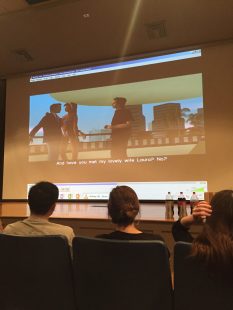
img_3402This semester, Sascha Goluboff, Professor of Cultural Anthropology, was awarded a DH initiative grant for her course titled “Writing Seminar for First Years: Terror and Violence.” I was invited by Professor Goluboff to view her students’ final DH projects in Stackhouse Theatre. The class was tasked with analyzing the popular video game “Grand Theft Auto” in terms of the racism and violence portrayed. Professor Goluboff asked students to pair up to create an iMovie that would analyze the depiction and their reactions to the violence in the game.
After completing a four page paper, the students were told to read their papers as narration in their iMovie project. While many of the students grumbled about disliking the sound of their own recorded voices, the students generally preferred creating a movie over writing a paper. “I liked iMovie more than the traditional paper. Images and scenes from iMovie can convey concepts and ideas in ways that are hard to describe on paper,” said first-year student Mikki Whittington. Most pairs came to the conclusion that the game promoted various sexist and racist stereotypes. For example, the students found that drug dealers were typically Hispanic, while more violent criminals were portrayed as black. The central, hyper-masculine male character was typically surrounded by highly sexualized women dressed in minimal clothing. One group argued that behaviors in this game could even lead gamers to believe this game is a mirror of reality.

The students incorporated images and clips from the video game into their iMovie project, which reinforced their arguments about the offensive stereotypes and harsh violence. “Their arguments about violence against women and minorities within the game were much more persuasive when paired up with actual footage. So, in a sense, the topic lent itself to a digital argument,” Professor Goluboff said.

Students said that they spent many hours on the project, but I felt that many of them really enjoyed the process of creating an iMovie project. The students were able to creatively manifest their ideas in the digital sphere and the video clips also strongly supported their argument. Since students often don’t get the chance to experience each other’s work, it was fun to see the students engaging with and enjoying one another’s final products (with some help from popcorn and soda provided by Professor Goluboff!)

-Hayley Soutter, DH Undergraduate Fellow

This program is made possible by a grant from the Andrew W. Mellon Foundation.

Categories
Conference DH Undergraduate Fellows

#BUDSC16

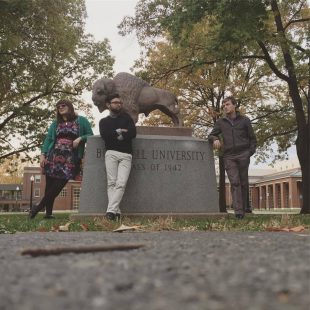
The Icebreakers - the 2016 version of the annual band photo.
The Icebreakers – the 2016 version of the annual Bucknell band photo.

It’s been just over a week since I went to my first academic conference (!) and I’m ready to share my experience. I went to BUDSC 16 over the weekend of October 28 – 30th with Mackenzie and Brandon.

The Bucknell University Digital Scholarship Conference, is held at Bucknell University (duh) in Lewisburg, Pennsylvania every year. This year, Mackenzie and Brandon graciously inserted me into their presentation about writing in the context of digital scholarship and digital humanities. More on that later. Overall, the conference was an extremely interesting and enlightening experience. It was also a lot of fun and I’m thankful that my professors/supervisors are great people to go road tripping with. Besides the endless icebreakers and a wrong turn in Pennsylvania, there was a lot to take in during the days of the conference. Here’s a brief rundown of what I participated in during the conference:

  • Arrived on Friday night, too late for conference activities, so we got dinner and prepared for Saturday.
  • Saturday morning: I attended a panel about “Reframing Art History Through Digital Approaches.” To me, it was pretty classic DH work. The panel included presentations by Bucknell University Art History students who explored collections in the Packwood House museum in Lewisburg and used Omeka to archive the most interesting collections, and a presentation about digital tools and using them for pedagogy, specifically for art history and teaching resources for art history.
  • After a break, Mackenzie and I went to panel called “Re-Envisioning and Reclaiming History”. This one started off with a great exhibition of a project from Middlebury College. You can watch it for yourself at collinwoodfire.org. It was an incredible multimedia website with an animated movie, newspaper articles, photographs, and other archival data to present the history of the Collinwood School fire in 1908. I highly recommend you check it out, especially the video. The latter half of the presentation was about using digital scholarship in the humanities to engage various audiences outside of academic environments.
  • The conference picked up for me at lunch. Safiya U. Noble, a professor at UCLA, gave the keynote address about “Power, Privilege, and the Imperative to Act in the Digital Age.” Her talk had to do with how digital applications and technology can perpetuate negative stereotypes and serve to reinforce oppressive ideology and history. Professor Noble brought up Google’s search results, the human and environmental impacts of the latest iPhone, and the sustainability of a programmer’s code. Everything was thought-provoking and made a lot of sense to me. It wasn’t necessarily enjoyable to listen to, but it was definitely something that many people needed to hear.
  • Next, Brandon and I went to a workshop that introduced visualizing data on social media such as Instagram and Twitter using websites such as Netlytics and Socioviz. Good to know if I intend to do any data mining for a future project.
  • Our presentation! The other two presentations before ours were also about the role of “Digital Scholarship in Higher Education.” Brandon and Mackenzie discussed and presented the uses of writing as a digital humanities method. Writing for the digital humanities, such as for blogs or to communicate in public (much like how I’m doing now) is very different from writing for an academic setting. I spoke for a bit about my perspective on how DH writing and blogging are different from writing that I’ve done for essays and/or literary analyses in my classes. I also discussed my honors thesis and how I’ll be incorporating DH writing into the notion of a traditional thesis.
  • Cocktail hour – students and professors presented about their various projects with posters and Powerpoints over hors d’oeuvres. I had the pleasure of meeting students from Lafayette College and their professor, and their presentations. And that was it for Saturday.
  • Sunday morning was almost as eye-opening as Professor Noble’s keynote. The first presentation was a little different from the two after. Dr. Heil presented about the pedagogy of large-scale digital scholarship. The next two were more about using digital scholarship to break down borders (the theme of the conference) in ways that may not be obvious. Sandra Nelson discussed the inherent phallogocentricity of programming and coding languages, while Emily McGinn talked about the Western and English-dominated aspects of digital scholarship.

Overall, BUDSC 16 was a worthwhile trip and a great opportunity for me. I thought my part of the presentation would be a bigger part of it for me, but the rest of what I learned and observed was much more valuable than a few minutes of speaking time. There are a couple more conferences this year that I might have the pleasure of attending, and presenting at, and I’m looking forward to them.

Categories
Announcement DH Pedagogy Publication Tools

Introduction to Text Analysis: A Coursebook

[Crossposted on my personal blog.]

I am happy to share publicly the initial release of a project that I have been shopping around in various talks and presentations for a while now. This semester, I co-taught a course on “Scandal, Crime, and Spectacle in the 19th Century” with Professor Sarah Horowitz in the history department here at Washington and Lee University. The course counted as digital humanities credit for our students, who were given a quick and dirty introduction to text analysis over the course of the term. In preparing for the class, I knew that I wanted my teaching materials on text analysis to be publicly available for others to use and learn from. One option might be to blog aggressively during the semester, but I worried that I would let the project slide, particularly once teaching got underway. Early conversations with Professor Horowitz suggested, instead, that we take advantage of time that we both had over the summer and experiment. By assembling our lesson plans far in advance, we could collaboratively author them and share them in a format that would be legible for publication both to our students, colleagues, and a wider audience. I would learn from her, she from me, and the product would be a set of resources useful to others.

At a later date I will write more on the collaboration, particularly on how the co-writing process was a way for both of us to build our digital skill sets. For now, though, I want to share the results of our work – Introduction to Text Analysis: A Coursebook. The materials here served as the backbone to roughly a one-credit introduction in text analysis, but we aimed to make them as modular as possible so that they could be reworked into other contexts. By compartmentalizing text analysis concepts, tool discussions, and exercises that integrate both, we hopefully made it a little easier for an interested instructor to pull out pieces for their own needs. All our materials are on GitHub, so use them to your heart’s content. If you are a really ambitious instructor, you can take a look at our section on Adapting this Book for information on how to clone and spin up your own copy of the text materials. While the current platform complicates this process, as I’ll mention in a moment, I’m working to mitigate those issues. Most importantly to me, the book focuses on concepts and tools without actually introducing a programming language or (hopefully) getting too technical. While there were costs to these decisions, they were meant to make any part of the book accessible for complete newcomers, even if they haven’t read the preceding chapters. The book is really written with a student audience in mind, and we have the cute animal photos to prove it. Check out the Preface and Introduction to the book for more information about the thinking that went into it.

The work is, by necessity, schematic and incomplete. Rather than suggesting that this be the definitive book on the subject (how could anything ever be?), we want to suggest that we always benefit from iteration. More teaching materials always help. Any resource can be a good one – bad examples can be productive failures. So we encourage you to build upon these materials in your courses, workshops, or otherwise. We also welcome feedback on these resources. If you see something that you want to discuss, question, or contest, please drop us a line on our GitHub issues page. This work has already benefited from the kind feedback of others, either explicit or implicit, and we are happy to receive any suggestions that can improve the materials for others.

One last thing – this project was an experiment in open and collaborative publishing. In the process of writing the book, it became clear that the platform we used for producing it – GitBook – was becoming a problem. The platform was fantastic for spinning up a quick collaboration, and it really paid dividends in its ease of use for writers new to Markdown and version control. But the service is new and under heavy development. Ultimately, the code is out of our control, and I want something more stable and more fully in my hands for long-term sustainability. I am in the process of transferring the materials to a Jekyll installation that would run off GitHub pages. Rather than wait for this final, archive version of the site to be complete, it seemed better to release this current working version out into the world. I will update all the links here once I migrate things over. If the current hosting site is down, you can download a PDF copy of the most recent version of the book here.

Categories
DH Research Projects Undergraduate Fellows

Markdown and Manuscripts

What I’m Currently Working On:


The Commissione of Gerolimo Morosini is a late 17th century manuscript that
serves simultaneously as a letter of appointment, a professional code of
conduct, and a list of legal actions and precedents. It was issued to Morosini,
a Venetian noble from a prominent family, by Doge Marcantonio Giustinian, whose
short reign of four years helps to accurately date the work. Currently housed
in Washington and Lee’s own Special Collections, working with this text offers
me a rare opportunity in several ways:

  • Commissioni are unique, as no more than two copies of each were ever made,
    meaning little, if any, research has already examined this piece
  • Transcribing and translating the text allows me to apply the Italian I am
    learning in class this year
  • Working with an item such as this might normally happen in graduate school,
    but I’m beginning this project as a sophomore

Needless to say, I’m extremely excited to have this chance to make some really
cool discoveries. But the problem with transcribing a manuscript, regardless
of its age, became apparent the very moment I began. How closely should I
replicate the appearance and context of the original text? In a poetic work,
elements such as enjambment and line breaks have an impact on the reader’s
perception of the work, and therefore ought to be preserved. Prose lacks these
restrictions, and may be rendered in a less restrictive format, but the issue
of chapters, titles, page numbers, and more can still pose a problem. No two
projects are identical, and it is up to the researcher to decide how to
approach the text.

Because the manuscript I am working on was written in prose and not verse, and
the text lacks page numbers and other identifying features, I have decided to
transcribe it in a manner as close to plaintext as possible. To this end I
have made use of Markdown, a simple way to format text without all the
complexity of a markup language like HTML or XML/TEI. It’s also very easy to
export to these formats later on, so Markdown presents the best option for me
to start transcribing as quickly and painlessly as possible.

While plaintext is great for its simplicity, it still helps to have a few more
features that Notepad lacks. Using the text editor Atom allows me to keep
track of particular elements by highlighting Markdown syntax, as seen here:

“Atom”

Items in orange are bold and indicate important sections of text, such as
passage headers/titles. Items in purple have been italicized by me, indicating
a word whose spelling or transcription I am not 100% certain of. I’ve used
dashes to indicate a hard-to-read letter and the pound symbol (not a hashtag!)
for headers to indicate recto and folio pages for my own ease of use.

As I spend more time working with the manuscript and studying Italian, I’ll go
back and edit the text appropriately. The ultimate goal for this project is to
have the entire commissione transcribed and then translated into English,
with both the Italian and English versions encoded using TEI/XML and made
publicly available.

– Aidan Valente